Public Member Functions | |
| chadoCheckTermsAreAsExpected ($options=['chado_schema'=> NULL, 'auto-expand'=> FALSE, 'auto-fix'=> FALSE, 'no-fix'=> FALSE]) | |
Protected Member Functions | |
| chadoCheckTerms_findProblems (&$problems, &$solutions, &$summary_rows, $options) | |
| chadoCheckTerms_findCVProblems (&$problems, &$solutions, &$summary_rows, $options) | |
| chadoCheckTerms_reportProblems ($problems, $solutions, $summary_rows, $options) | |
| chadoCheckTerms_checkVocab (array $vocab_info, array &$problems, array &$solutions) | |
| chadoCheckTerms_checkIdSpaces (array $vocab_info, array &$problems, array &$solutions) | |
| chadoCheckTerms_checkTerm (array $term_info, array &$problems, array &$solutions) | |
| chadoCheckTerms_printSummaryTable (array $summary_rows) | |
| updateChadoTermRecords (string $table_name, string $pkey, array $records) | |
| migrateObsoleteVocabularies (array $cv_ids) | |
| chadoCheckTerms_reportProblem_yamlDuplication ($problems, $solutions, $options) | |
| chadoCheckTerms_reportProblem_missingDbYaml ($problems, $solutions, $options) | |
| chadoCheckTerms_reportProblem_obsoleteCv ($problems, $solutions, $options) | |
| chadoCheckTerms_reportProblem_terms ($problems, $solutions, $options) | |
| chadoCheckTerms_reportProblem_eccentricCv ($problems, $solutions, $options) | |
| chadoCheckTerms_reportProblem_eccentricDb ($problems, $solutions, $options) | |
| chadoCheckTerms_reportProblem_eccentricCVTerm ($problems, $solutions, $options) | |
Protected Attributes | |
| $chado_schema | |
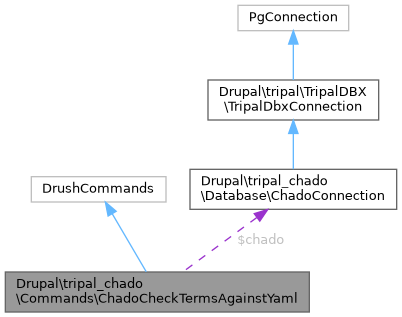
| ChadoConnection | $chado |
| string | $red_format = "\033[31;40m\033[1m %s \033[0m" |
| string | $yellow_format = "\033[1;33;40m\033[1m %s \033[0m" |
Detailed Description
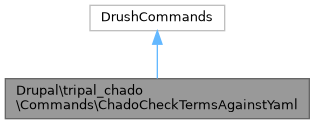
Drush command specific to checking the cv/db/cvterm/dbxref records in a specific chado schema against the expected terms in the Tripal Content Terms YAML.
DO NOT ADD ADDITION DRUSH COMMANDS TO THIS CLASS.
Member Function Documentation
◆ chadoCheckTerms_checkIdSpaces()
|
protected |
Checks that the id space metadata in the YAML matches this chado instance.
- Parameters
-
array $vocab_info array $problems array $solutions
- Returns
- array
- summary_dbs: an array where the key is the id space name and the value summarizes its status.
- defined_idspaces: an array where the key is the id space name and the value is the db_id found or NULL if not.
◆ chadoCheckTerms_checkTerm()
|
protected |
Checks that the term metadata in the YAML matches this chado instance.
- Parameters
-
array $term_info array $problems array $solutions
- Returns
- array
- summary_cvterm: the value to print in the summary table
- summary_dbxref: the value to print in the summary table
◆ chadoCheckTerms_checkVocab()
|
protected |
Checks that the vocabulary metadata in the YAML matches this chado instance.
- Parameters
-
array $vocab_info array $problems array $solutions
- Returns
- array
- summary_cv: the value to print in the summary table
- existing_cv: the cv object selected from the database or NULL if there wasn't one.
◆ chadoCheckTerms_findCVProblems()
|
protected |
Checks for obsolete vocabularies in the database.
- Parameters
-
array $problems Array containing details for either errors or warnings array $solutions Array containing possible solutions for either errors or warnings array $summary_rows Infomation for the output table array $options Options from drush command line
◆ chadoCheckTerms_findProblems()
|
protected |
Checks all YAML specifications and compares to current chado state.
- Parameters
-
array $problems Array containing details for either errors or warnings array $solutions Array containing possible solutions for either errors or warnings array $summary_rows Infomation for the output table array $options Options from drush command line
◆ chadoCheckTerms_printSummaryTable()
|
protected |
Prints a beautiful summary table showing the status of all terms.
- Parameters
-
array $summary_rows
- Returns
- void No need to return as we are printing directly.
◆ chadoCheckTerms_reportProblem_eccentricCv()
|
protected |
Reports warnings and potential solutions for the "cv" warning type.
Trigger Example: Imagine there is a vocabulary defined whose
- definition in the YAML is different from in your chado instance
- Parameters
-
array $problems An array describing instances with this type of warning with the following format: - [Existing cv_id]: an array of reports describing how this cv differs in your chado instance from what is defined in the YAML. Each report has the following structure:
- vocab-name: the name of the vocabulary in the YAML which must match the cv in your chado instance.
- column: the chado column showing a difference
- property: the yaml property being compared
- YOURS: the value in your chado instance
- THEIRS: the value in the YAML
array $solutions An array describing possible solutions with the following format: - [Existing cv_id]: an array of columns in the cv table to update. Each entry has the following structure:
- [column name]: [value in YAML]
- [Existing cv_id]: an array of reports describing how this cv differs in your chado instance from what is defined in the YAML. Each report has the following structure:
- Returns
- void This function interacts through command-line input/output directly and as such, does not need to return anything to the parent Drush command.
◆ chadoCheckTerms_reportProblem_eccentricCVTerm()
|
protected |
Reports warnings and potential solutions for the "cvterm" warning type.
Trigger Example: Imagine there is a cvterm defined whose
- definition in the YAML is different from in your chado instance
- Parameters
-
array $problems An array describing instances with this type of warning with the following format: - [Existing cvterm_id]: an array of reports describing how this cvterm differs in your chado instance from what is defined in the YAML. Each report has the following structure:
- term-name: the name of the term in the YAML which must match the cvterm in your chado instance.
- term-id: the full id of the term in the YAML which must match the connected dbxref in your database.
- column: the chado column showing a difference
- property: the yaml property being compared
- YOURS: the value in your chado instance
- THEIRS: the value in the YAML
array $solutions An array describing possible solutions with the following format: - [Existing cvterm_id]: an array of columns in the cvterm table to update. Each entry has the following structure:
- [column name]: [value in YAML]
- [Existing cvterm_id]: an array of reports describing how this cvterm differs in your chado instance from what is defined in the YAML. Each report has the following structure:
- Returns
- void This function interacts through command-line input/output directly and as such, does not need to return anything to the parent Drush command.
◆ chadoCheckTerms_reportProblem_eccentricDb()
|
protected |
Reports warnings and potential solutions for the "db" warning type.
Trigger Example: Imagine there is a ID Space defined whose
- definition in the YAML is different from in your chado instance
- Parameters
-
array $problems An array describing instances with this type of warning with the following format: - [Existing db_id]: an array of reports describing how this db differs in your chado instance from what is defined in the YAML. Each report has the following structure:
- idspace-name: the name of the id space in the YAML which must match the cv in your chado instance.
- column: the chado column showing a difference
- property: the yaml property being compared
- YOURS: the value in your chado instance
- THEIRS: the value in the YAML
array $solutions An array describing possible solutions with the following format: - [Existing db_id]: an array of columns in the db table to update. Each entry has the following structure:
- [column name]: [value in YAML]
- [Existing db_id]: an array of reports describing how this db differs in your chado instance from what is defined in the YAML. Each report has the following structure:
- Returns
- void This function interacts through command-line input/output directly and as such, does not need to return anything to the parent Drush command.
◆ chadoCheckTerms_reportProblem_missingDbYaml()
|
protected |
Reports errors and potential solutions for the "missingDbYaml" error type.
Trigger Example: Imagine there is a term defined whose id is DATUM:12345 but the vocabulary this term is in either
- has a number of ID Spaces defined but none of them have the idSpaces[name] of 'DATUM' (case sensitive match required).
- does not have any id spaces defined.
- Parameters
-
array $problems An array describing instances with this type of error with the following format: - [YAML ID Space name]: an array of reports where a term had the ID Space indicated by the key despite that ID Space not being defined in the YAML. Each report has the following structure:
- missing-db-name:
- defined-dbs:
- term:
- vocab:
array $solutions There are currently no easy suggested solutions for this but the parameter is here in case we decide to be more helpful later ;-p - [YAML ID Space name]: an array of reports where a term had the ID Space indicated by the key despite that ID Space not being defined in the YAML. Each report has the following structure:
- Returns
- void This function interacts through command-line input/output directly and as such, does not need to return anything to the parent Drush command.
◆ chadoCheckTerms_reportProblem_obsoleteCv()
|
protected |
Reports errors and potential solutions for the "obsolete_cv" error type.
Trigger Examples: Imagine a term defined with a vocabulary of 'organism_property'
- Parameters
-
array $problems An array describing instances with this type of error with the following format: - [YAML Term ID]: an array of reports where each report has the following structure:
- vocab-name:
- vocab-id:
- message: will always contain 'Obsolete controlled vocabulary'
array $solutions Just a placeholder, will always contain 'Move to local CV' - [YAML Term ID]: an array of reports where each report has the following structure:
- Returns
- void This function interacts through command-line input/output directly and as such, does not need to return anything to the parent Drush command.
◆ chadoCheckTerms_reportProblem_terms()
|
protected |
Reports errors and potential solutions for the "term" error type.
Trigger Examples: Imagine a term defined with a name of 'Location' and an id of 'NCIT:C25341'
- Parameters
-
array $problems An array describing instances with this type of error with the following format: - [YAML Term ID]: an array of reports where each report has the following structure:
- term-name:
- term-id:
- category:
- message:
- error-column
- YOURS
- EXPECTED
array $solutions There are currently no easy suggested solutions for this but the parameter is here in case we decide to be more helpful later ;-p - [YAML Term ID]: an array of reports where each report has the following structure:
- Returns
- void This function interacts through command-line input/output directly and as such, does not need to return anything to the parent Drush command.
◆ chadoCheckTerms_reportProblem_yamlDuplication()
|
protected |
Reports errors and potential solutions for the "yamlDuplication" error type.
Trigger Example: the term local:lineage is defined twice in tripal.tripal_content_terms.chado_content_terms.yml
- Parameters
-
array $problems An array describing instances with this type of error with the following format: - [YAML ID Space name]: an array of reports where a term had the ID Space indicated by the key despite that ID Space not being defined in the YAML. Each report has the following structure:
- name:
- id:
array $solutions There are currently no easy suggested solutions for this but the parameter is here in case we decide to be more helpful later ;-p - [YAML ID Space name]: an array of reports where a term had the ID Space indicated by the key despite that ID Space not being defined in the YAML. Each report has the following structure:
- Returns
- void This function interacts through command-line input/output directly and as such, does not need to return anything to the parent Drush command.
◆ chadoCheckTerms_reportProblems()
|
protected |
Reports to user the status of chado as determined by chadoCheckTerms_findProblems.
- Parameters
-
array $problems Array containing details for either errors or warnings array $solutions Array containing possible solutions for either errors or warnings array $summary_rows Infomation for the output table array $options Options from drush command line
◆ chadoCheckTermsAreAsExpected()
| Drupal\tripal_chado\Commands\ChadoCheckTermsAgainstYaml::chadoCheckTermsAreAsExpected | ( | $options = ['chado_schema' => NULL, 'auto-expand' => FALSE, 'auto-fix' => FALSE, 'no-fix' => FALSE] | ) |
Checks a given chado install for any inconsistencies between its cvterms and what Tripal expects.
@command tripal-chado:trp-check-terms @aliases trp-check-terms @option chado_schema The name of the chado schema to check. @option auto-expand Indicates that you always want to show specifics of any errors or warnings. @option auto-fix Indicates that you always want us to attempt to fix any issues without the need for us to prompt. @option no-fix Indicates that you do not want us to offer to fix anything. @usage drush trp-check-terms –chado_schema=chado_prod Checks the terms stored in chado_prod.cvterm for consistency.
◆ migrateObsoleteVocabularies()
|
protected |
Migrates terms in obsolete vocabularies to "local" vocabulary, and then removes the obsolete vocabularies.
- Parameters
-
array $cv_ids An associative array of the obsolete vocabularies, key is pkey_id, value is vocabulary name.
- Returns
- void
◆ updateChadoTermRecords()
|
protected |
Updates records in chado based on an array of records.
- Parameters
-
string $table_name The name of the chado table to be updated. string $pkey The name of the primary key of the table to be updated. array $records An array of the following format: - [primary key of the table]: an array of columns to update where each is of the form:
- [column]: [value to update it to]
- [primary key of the table]: an array of columns to update where each is of the form:
- Returns
- void
The documentation for this class was generated from the following file:
- tripal_chado/src/Commands/ChadoCheckTermsAgainstYaml.php